Image Info VS Code Extension
Contents
VS Code’s built-in image preview is handy, but it only tells you the dimensions and file size in the status bar. When I’m working with images I often want to know more: is this JPEG progressive? Does it have a color profile? How big is this SVG once it’s gzipped? I used to switch to another app to find out, so I made an extension that shows it all right inside VS Code: Image Info.
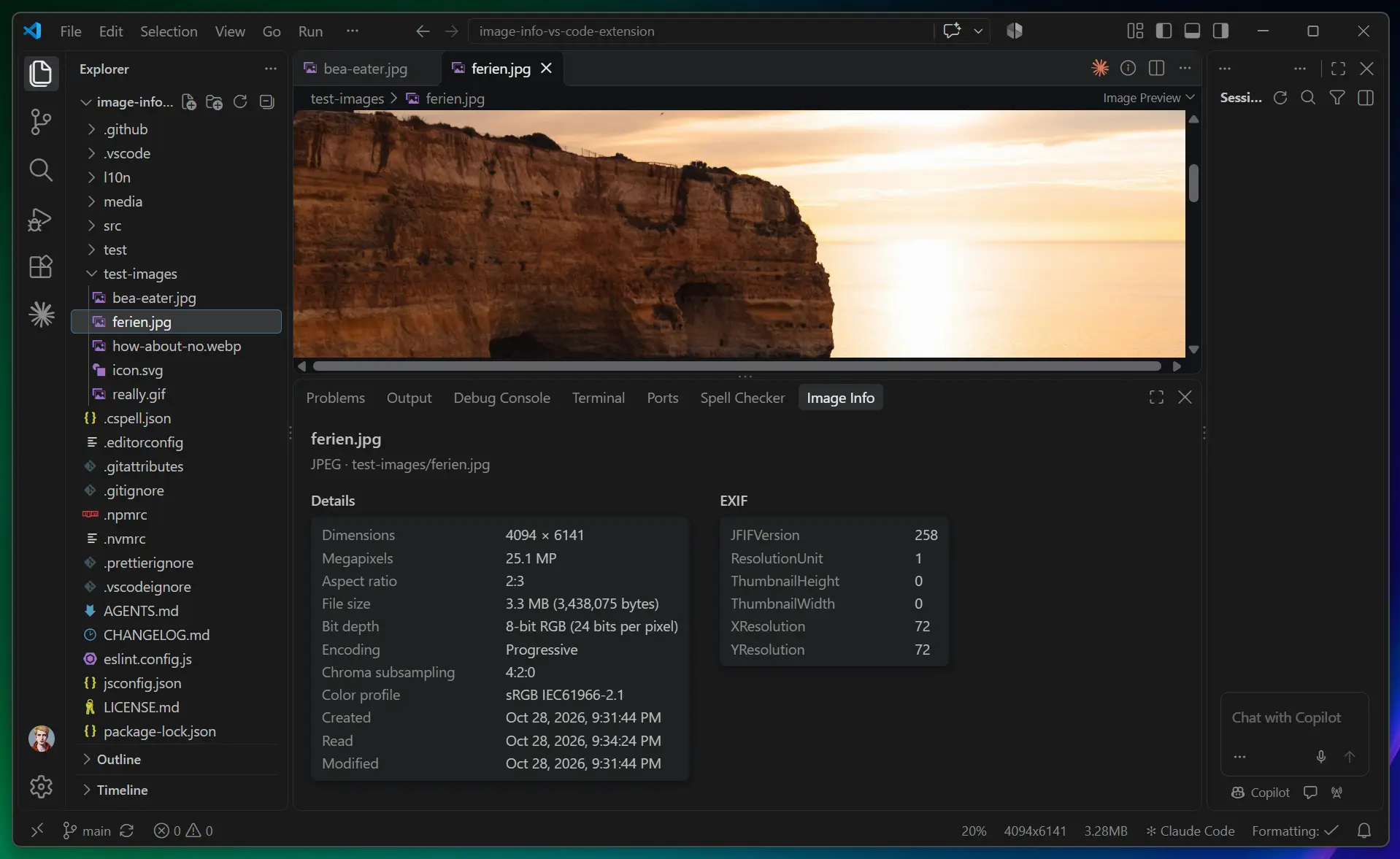
Open an image and the Image Info panel appears with everything about it, and EXIF data sits beside the other details when the panel is wide enough.
What it shows
- Dimensions, megapixels and aspect ratio
- Orientation
- Created, read and modified times
- File size, and optionally the uncompressed size
- Gzipped size for SVG files
- Bit depth
- JPEG encoding and chroma subsampling
- Color profile, primaries and transfer function
- HDR light levels for AVIF and HEIC
- Animation details for GIF, APNG and animated WebP
- EXIF data
It supports AVIF, BMP, CUR, GIF, HEIC, HEIF, ICO, JPEG, PNG, SVG, TIFF and WebP. SVG files also get a preview beside the details (and skip megapixels, which don’t mean much for a vector image), and bit depth is left out when a format doesn’t store one.
The panel, command and settings are available in English, French, German, Italian, Japanese and Spanish, and follow your VS Code display language.
Usage
The panel opens automatically when an image is focused. If you close it, run Image Info: Show Image Info from the Command Palette to open it again.
There are two settings:
imageInfo.autoShow: set tofalseto stop the panel from opening on its own.imageInfo.showUncompressedSize: set totrueto show the uncompressed size.
Image Info is free and available now from the Visual Studio Marketplace.
https://marketplace.visualstudio.com/items?itemName=coliff.image-info-vs-code-extension
Happy to hear any feedback, suggestions or feature requests (Mastodon and Bluesky links below).